
Summary
Picture the access request sitting in your queue right now. Someone wants an artificial intelligence (AI) workflow connected to the customer database, and the request reads like it needs everything in there. Nobody asked the harder question first: what does this workflow have to touch to do its job? Technical availability does not establish business need. A system may have permission to search an entire customer database while needing five fields for one task. An agent may have permission to read email while needing messages from a single monitored mailbox. Every unnecessary data source you connect adds exposure, processing cost, and one more failure mode you have to anticipate.
The National Institute of Standards and Technology (NIST) recommends connecting AI governance with your existing data governance, especially for sensitive information. Its guidance calls for documented purposes, intended uses, and operating boundaries. NIST’s Privacy Framework makes the same point from the privacy side. Responsible data processing starts with a clear purpose and enterprise risk management, not with whatever a connector happens to make available. Your goal is controlled access that supports real work without exposing your entire information environment to one narrow workflow.
Start with the workflow, not the product
Most data decisions begin with the wrong question: can this assistant reach SharePoint, Salesforce, or email? That question starts too far downstream. Decide the work itself first: the business problem, the triggering event, and the information required. Also decide the consequence the output supports, and what a wrong result would cost you.
A sales account research workflow needs the company name, account status, recent activity, and assigned ownership. It does not need payment details, every employee note, or complete email histories. Name the purpose first, and you narrow the access conversation before anyone opens a permissions dashboard. Approve the smallest useful information set, and require a new business reason before granting anything beyond it.
Set the boundary with four classification tiers
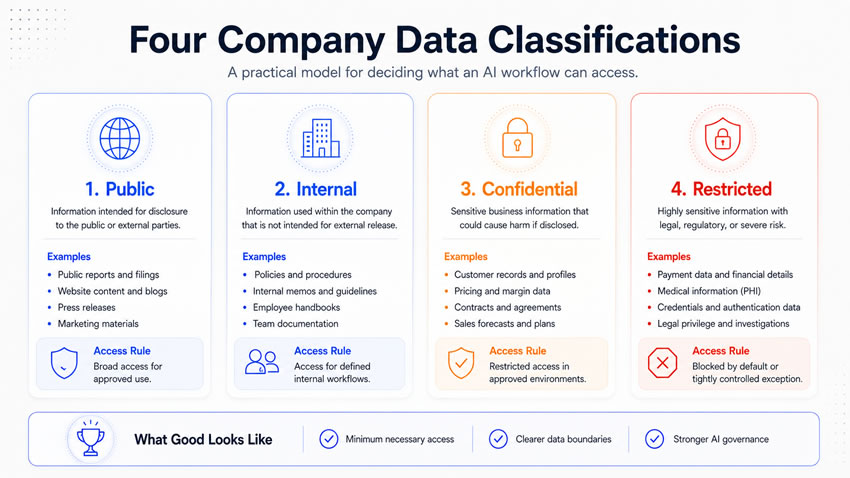
Most companies already classify information through security, privacy, or records programs. Reuse those existing definitions for AI governance rather than inventing a parallel system. A four-level model covers most business information cleanly.
Public information, published pages, press releases, and public research, is approved for unrestricted external use and can generally receive broad approval through sanctioned products. Public status is not the same as unrestricted use, though. A workflow can still treat an outdated page as current, or present a marketing claim as a verified fact. It can also collect public personal information that was never appropriate for this particular task. Attach approved sources, required dates, and citation requirements to public data too.
Internal information, employee procedures, internal calendars, and general operating reports, may look harmless because employees already have access to it individually. AI changes how fast that information gets searched, combined, and distributed at scale. A single employee reading a few documents is nothing like a connected workflow retrieving thousands of documents at once. That combination carries aggregation risk on its own: several low-sensitivity records can reveal a genuinely sensitive pattern once they sit next to each other. An unannounced launch can become visible in project schedules, and a restructuring can become visible in staffing records. Let internal access follow the requesting employee’s existing permissions, rather than granting the workflow anything broader.
Confidential information, customer records, contracts, forecasts, and product plans, carries the greatest pressure for AI use. It contains the exact context that would genuinely improve a workflow’s output. It also creates real exposure after inappropriate access or retention. Never let confidential access come from a product-wide approval. Approve the use case, the exact information set, the deployment, and the controls together. The burden sits with the requester to justify why each additional source supports the approved result.
Restricted information, credentials, payment card data, protected medical information, and legally privileged communications, needs the opposite presumption. Deny access by default rather than grant it by default. Require a compelling purpose, specialist review, and evidence that less sensitive information genuinely cannot meet the need before you approve it. Some of this information should never enter a model prompt at all. A service agent may need confirmation that identity verification occurred. It does not need the customer’s government identification number itself. A reference, token, or masked value can carry the same operating signal without the underlying exposure.
Apply minimum necessity inside every tier, not only the sensitive ones
Minimum necessary access means the workflow gets the smallest information set its approved purpose requires. Ask that question separately for sources, records, fields, dates, and actions. Which sources are required: customer relationship records and approved website activity, not the entire email archive. Which records: accounts assigned to this workflow, not every customer in the company.
Which fields: case description, product, and status, not payment information sitting in the same table. Which period: 90 days of activity, not 10 years of history. Which actions: read access and permission to draft, not permission to edit source records or delete files. Connect every one of those five answers to a documented task. Convenience should never be the reason a broader answer wins.
Let retrieval architecture enforce this automatically, rather than relying on restraint. A retrieval layer can locate relevant records before anything reaches the model, so the model itself only ever sees a smaller, already-filtered set. That design improves cost, source visibility, and reviewability all at once. The layer still needs its own governance. A retrieval system that ignores user permissions can expose a colleague’s confidential notes because the model was technically capable of finding them. Test this directly with employees holding different roles. Do not assume the permission boundary holds because you configured it correctly once.
Read the vendor terms, since they decide what access means
One provider can offer a consumer app, a business account, an application programming interface (API), and third-party integrations. Each of those can carry different data terms under the same brand name. OpenAI excludes business data from model training by default and offers configurable retention for qualifying organizations. Anthropic treats commercial data differently from consumer data, with retention that still depends on the specific product and agreement. Google Workspace states that chats and files are not used to train generative models outside the organization without permission. Third-party applications connected through Gemini can still follow entirely different terms. Microsoft states that prompts and completions in covered Azure model services stay unavailable to other customers and excluded from training without explicit permission.
Before confidential or restricted information reaches any of these products, get answers to seven questions. Will the provider use this data for training? How long will it retain each type of record? Where does processing and storage occur, and who can access the data internally at the vendor? What security and administrative controls exist? Can you export and delete your own information? Do optional features like search or memory quietly change any of the above? Never let a product approval based on the default chat experience automatically cover every feature the vendor adds later.
Give permissions and service identities their own design
Never let an approved AI product hand every user access to every connected source by default. Match permissions to the employee’s actual role and the workflow’s specific purpose. Keep existing source permissions in force, rather than letting them get bypassed because a connected assistant happens to have broader technical reach. An employee with general access to a customer record does not automatically justify the AI workflow touching every field in it.
Give automated workflows running through service accounts or agent identities the same discipline. Those identities should never inherit broad administrator permissions for convenience. Read, write, send, approve, and delete are different authorities, and your architecture should treat them separately. A service identity can prepare a draft record, a person can approve it, and a separate controlled system can complete the transaction. That separation limits how far one compromised or misconfigured identity can reach.
Give access the same lifecycle discipline as any other business system. Update or remove it after a role change, a department transfer, or an employee’s departure. A former project member who quietly keeps access to a sensitive assistant is a common and preventable gap.
Close the loop with retention and audit
A workflow can create copies of company information in far more places than anyone tracks by default. Source systems, retrieval indexes, prompts, conversation history, logs, backups, and vendor safety systems can each hold a copy. Saying “the vendor retains data for 30 days” answers almost nothing about how long an output lives inside your business application itself. Cover every one of those copies in your retention decision. Distinguish what must remain for legal or business reasons from what can be deleted the moment the workflow finishes with it. Shorter retention reduces exposure, but applied carelessly it can also weaken your own ability to investigate, correct, or maintain continuity later.
Scale your audit requirements with consequence, rather than applying them uniformly. A brainstorming session may need no lasting record at all. A recommendation behind a material financial decision needs a complete one. That record should include the input source, the model version, the human review, the final decision, and any exceptions. NIST’s security controls call for audit-event generation, review, and protection for exactly this reason. Avoid letting the design itself become another unrestricted repository of sensitive information. Give logs enough detail to support an investigation without copying every confidential value into a second, less-guarded location.
Turn this into a repeatable decision with seven factors
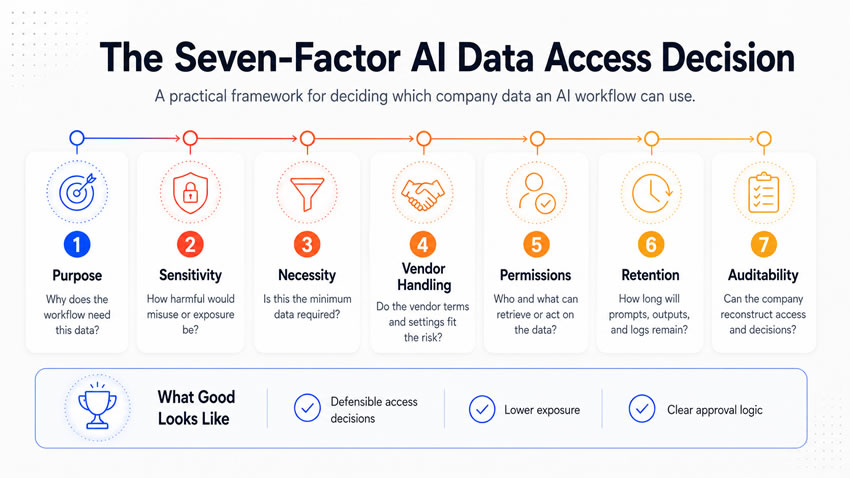
Score each proposed data source from one to five across seven factors: purpose, sensitivity, minimum necessity, vendor handling, permissions, retention, and auditability. A one on purpose means the requester cannot explain why the data supports the workflow at all. A five means every approved element has a documented role. A one on sensitivity means restricted information paired with inadequate controls. A five means public information approved for exactly this use. The same logic runs through the other five factors, each asking whether the access, once granted, will stay inside the boundary you intended.
Let hard gates block approval before you calculate any score, because a strong average can still hide one disqualifying weakness. A workflow should not proceed if it lacks a defined purpose, or if the vendor may train on confidential data without approved consent. It should not proceed if you cannot determine retention or if a service identity holds broad administrator access. It should also stop if nobody can name the responsible business owner and data owner. A failed gate does not mean the underlying use case lacks value. It usually means the workflow needs narrower fields, a different product, added masking, or a smaller user group first.
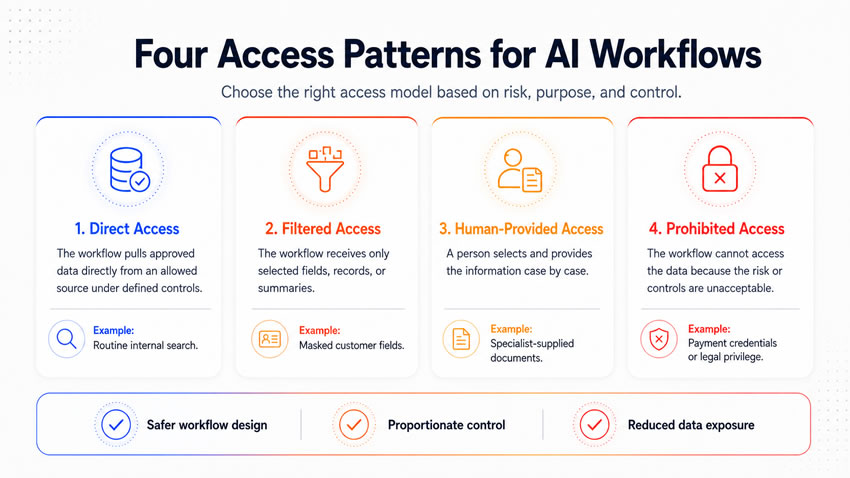
End the review in one of four decisions. Approved for direct access fits when sensitivity and controls both support it. Approved through filtered access fits when the data is useful but needs stronger minimization. Approved through human-provided access fits when a qualified employee should select the information case by case. Access prohibited applies when no proposed architecture meets the requirement yet.
Watch how the tiers play out across your functions
Marketing can use public research and internal brand standards with only workflow-appropriate access. Confidential customer segments and pricing plans need restricted fields and distribution. A general marketing assistant almost never has a legitimate reason to touch payment or medical information, regardless of how personalized the campaign gets.
Sales account briefs can draw on opportunity history and product usage limited to assigned accounts. A salesperson’s own access to a customer record does not establish a need for every field in it. Keep banking credentials or protected employee information out of the workflow entirely.
Finance can use public filings and internal procedures freely. Confidential budgets and forecasts need retention and audit controls that match the stakes, and restricted payment credentials should never reach a general assistant. A workflow can prepare a transaction using a masked reference without ever holding the authority or credentials to release it.
Human resources carries the narrowest defaults of any function. Confidential compensation or performance data needs a defined purpose and qualified users only. Restricted medical, investigation, or background information should stay inside its own controlled system. It should never reach a general AI assistant because it lives on the same platform.
Watch for the signs that access has grown too broad
A handful of patterns reliably signal drift. The workflow retrieves information unrelated to its output, or employees can no longer explain why a connected source is still there. Logs contain complete sensitive records instead of the minimum needed for investigation, or a service identity quietly holds administrator permissions nobody remembers granting. A vendor feature that changes data handling deserves the same response, as does a workflow whose purpose has quietly expanded. A project still running after its original owner has moved on deserves it too. Narrow the fields, revise the permissions, or pause the workflow until access gets re-justified from scratch.
Run this 30-day process to establish controlled access
Week one. Map the workflow from trigger through completion, name every information source, and classify each one. Remove anything that does not clearly support the output.
Week two. Document the exact product, plan, region, and feature set the vendor will provide. Define retrieval and masking, and apply the mandatory gates before designing anything else.
Week three. Configure user roles and service identities, and limit sources, fields, and actions to the documented minimum. Set retention, logging, and incident routing.
Week four. Test the boundary directly with normal users, restricted users, and unauthorized requests. Confirm the workflow retrieves only approved information, then record the approval, owner, and review date.
What you tell them at the end
An AI workflow rarely needs every record the technology is technically capable of reaching. A product can be approved for public research without being approved for confidential customer records. An agent can draft a record without holding permission to release the transaction it describes. The strongest data architecture gives a workflow enough information to do its job. It also gives you evidence that the workflow never touched anything beyond that boundary.