
Summary
Ask a team whether their AI workflow is working, and they point to the dashboard. Generation time down to a minute, output up threefold. Ask the employee sitting next to that dashboard, and you get a different answer. She still spends 12 minutes formatting and entering that one-minute output into the system it was supposed to update on its own. Nobody counted her time. Nobody asked her.
An artificial intelligence (AI) workflow is failing when the complete process requires more human effort than the previous method did. The model may produce an answer faster. Employees may still spend more time preparing inputs, correcting outputs, moving information, and managing exceptions. None of that shows up when your team only counts generation time. Massachusetts Institute of Technology (MIT) research recommends examining task sequences, dependencies, and handoffs across the complete workflow, not the isolated step that got faster.
Deloitte found that 66 percent of surveyed organizations reported productivity or efficiency gains from AI. Only 20 percent reported revenue growth from those same investments. A useful workflow should reduce total effort, improve outcomes, or lower meaningful risk, without quietly creating equal work somewhere else. The ten signs below show exactly where that hidden labor tends to hide.
One: the same corrections keep coming back
One correction can reflect an unusual case. The same correction across many cases signals a design problem, not a series of isolated mistakes. Teams tolerate this because each fix looks small, five minutes beside an hour previously spent creating the output. The total changes fast once hundreds of outputs need the same five minutes. Experienced employees become permanent editors for work that was supposed to release their capacity. The pattern often stays invisible because they edit the output before saving it, so the final record looks clean while the correction never gets counted.
Track corrections at the point of review: the category, the severity, the time required, and the input or rule that caused it. Separate minor presentation fixes from material business corrections, since a punctuation change and a corrected price carry different exposure. McKinsey found that nearly one-third of respondents had experienced negative consequences from AI inaccuracy. High-performing organizations were far more likely to have a defined human validation process in place. Group recurring corrections by cause, and fix the workflow when one problem repeats. Never leave employees absorbing permanent correction work as if it were a feature of the job.
Two: someone still moves the output by hand
Manual transfers mean AI completed a task without completing the workflow. Someone copies research into a customer system, downloads and renames a file, or sends a notification the workflow cannot route on its own. Each step adds delay and a fresh chance for error. The source, output, and final record often end up scattered across separate locations, which makes the whole thing hard to trace later.
Count every manual touch between the original request and the completed action. Note what is being moved, where it starts and ends, and how long it takes. Note why automation still is not handling it. Generating an account brief in one minute means little if an employee then spends 12 minutes formatting and entering it elsewhere. Define one approved destination for the output and let the workflow update the business record directly whenever risk allows. A temporary manual transfer needs an owner and an expiration date. It should never become permanent through habit.
Three: the same output gets checked by three different people
Duplicated review usually means nobody trusts the workflow’s quality standard. A frontline employee checks the output, and a manager checks it again. A subject expert checks it a third time because the first two reviewers lacked authority or knowledge. Each layer feels like protection to the person adding it. Together they are often redundant.
Map every review point and its actual purpose, then compare the change rate between layers. A second review that rarely reverses the first decision is providing limited value. Assign one clear purpose to each review point instead. A subject expert checks factual and professional quality, legal reviews only the claims with real exposure, and a manager approves financial commitments. Give every reviewer acceptance criteria they can apply consistently, and clear authority to approve, correct, reject, or escalate. Review should protect a defined consequence, not compensate for general discomfort with the technology.
Four: employees are still cleaning the data before AI ever sees it
AI workflows depend on information that often arrives incomplete, duplicated, or outdated. Employees quietly spend time finding documents and repairing fields before the system ever sees them. The workflow then looks efficient because measurement starts after that preparation is already done. Unreliable source data is not only added labor either. It can produce a confident-sounding output built on weak information.
Observe the work before anything enters the AI system: which sources people have to hunt down, and which fields they complete by hand. Test with strong, typical, and weak inputs, since strong inputs only show technical potential while typical and weak inputs show operating reality. Build an input profile naming the required fields, approved sources, and acceptable quality limits. Have the workflow detect missing or conflicting information and route the case rather than guessing. The National Institute of Standards and Technology (NIST) recommends connecting AI governance directly with existing data quality standards. Artificial intelligence tends to make poor data ownership easier to overlook rather than fixing it.
Five: two people run the same workflow and get two different answers
When different users provide different instructions, sources, or context, the model responds differently even to similar requests. Employees develop personal workarounds to get a result they trust. One person writes an elaborate prompt. Another repeats the request until something usable comes back. Your company believes it has one workflow. Employees are running several different versions of it.
Run a standard test set across users, times, and configurations. Record the prompt, model, and source material behind every test, since without that record nobody can explain why quality changed. Standardize the parts of the workflow that should stay consistent: approved instructions, source materials, and output structure. Limit unnecessary user choice. Allow controlled variation exactly where professional judgment genuinely needs it, such as situational language in a customer response. Keep the required facts and commitments stable underneath it.
Six: exceptions get handled once and then forgotten
Every workflow meets cases that fall outside the normal path: a missing input, conflicting records, a request outside policy. During a pilot, the project team quietly steps in and fixes these by hand, and the exception never makes it into the actual workflow documentation. Production volume then sends the same recurring exceptions toward whoever happens to notice them first.
Build an exception register recording the condition, its frequency, its business impact, and the time it takes to resolve. Distinguish an exception that needs expert judgment from one that is a system failure needing technical support instead. The two create different kinds of work. Assign a real destination to every known exception, and build a safe default, pause or escalate, for anything the system cannot classify reliably. A frequent exception should become a designed path in the workflow. A rare, high-impact one should keep clear human ownership permanently.
Seven: the queue is growing faster than the work is getting done
AI can generate drafts and recommendations in seconds, while human reviewers still have the same limited working hours they always had. The result is a bigger queue, not more capacity. A growing queue can look productive on a dashboard even while the business receives fewer completed actions than before. Employees respond by rushing review, delaying work, or approving things too quickly to keep the queue moving.
Track generated work separately from accepted work: outputs generated, awaiting review, approved, and rejected, plus average review time. Add the 90th percentile queue age specifically, since a handful of old cases often reveals the difficult work everyone has quietly stopped touching. Reduce unnecessary generation, and prioritize by business value instead of processing everything in the order it arrives. Apply risk-based review so routine outputs get sampled while high-impact work still gets full approval. Throughput has not increased if the review queue is the thing holding the value hostage.
Eight: people are quietly still doing it the old way too
Running the old process alongside the new one means employees do not trust the new workflow yet, or genuinely cannot rely on it. Someone uses AI to prepare an analysis, then quietly repeats it by hand. A manager asks for both versions until confidence improves. This looks responsible during an early pilot. It gets expensive fast once the duplicate work continues indefinitely without anyone deciding to stop it. Leadership keeps reporting time savings based only on the faster AI step.
Look for duplicate records and unofficial backup files, and ask employees directly which parts of the old process they still quietly keep running and why. Observe behavior rather than trusting stated adoption, since someone can look fully active in the new system while still repeating every task the old way. Decide whether the parallel process is a genuine temporary control, with a removal condition and a review date, or evidence the workflow failed. Never let leadership claim released capacity while employees are still running two processes to get one result.
Nine: one person is quietly holding the whole thing together
Every AI workflow needs maintenance after launch: models change, source systems change, authentication expires, prompts need revision. A workflow can look self-running because one employee quietly watches it closely and fixes problems before anyone else notices. Leadership sees a workflow humming along on its own. That employee sees one more system demanding daily attention nobody funded.
Build a maintenance ledger tracking failures, prompt and rule changes, access issues, and user support requests. Include work performed by business employees and technical teams alike. Calculate the true monthly operating cost rather than only the software line item. Assign a named technical owner and business owner, and build alerts that expose failures automatically rather than depending on one person’s vigilance. NIST recommends continuous monitoring, incident response, and change management across the AI lifecycle for exactly this reason. Invisible maintenance becomes a real continuity risk the moment only one person understands how the workflow works.
Ten: activity is up and results are flat
More documents, recommendations, and automated actions do not guarantee better business performance. A marketing team can publish more content without moving qualified demand. A sales team can generate more account briefs without improving meetings or pipeline. The workflow is creating work, not removing it, the moment people have to process more output without getting a stronger result in return.
Connect workflow activity to one defined business outcome: conversion, revenue contribution, customer resolution, or risk reduction. Measure the complete operating cost against it, including correction, review, support, and maintenance, not only the license. Deloitte’s 2026 research found a substantial gap between reported productivity gains and reported revenue gains. That gap is exactly why business measurement has to sit above activity reporting. Give every output a destination, an owner, and an expected business effect. A growing volume of unused work is the clearest sign a workflow needs a narrower purpose.
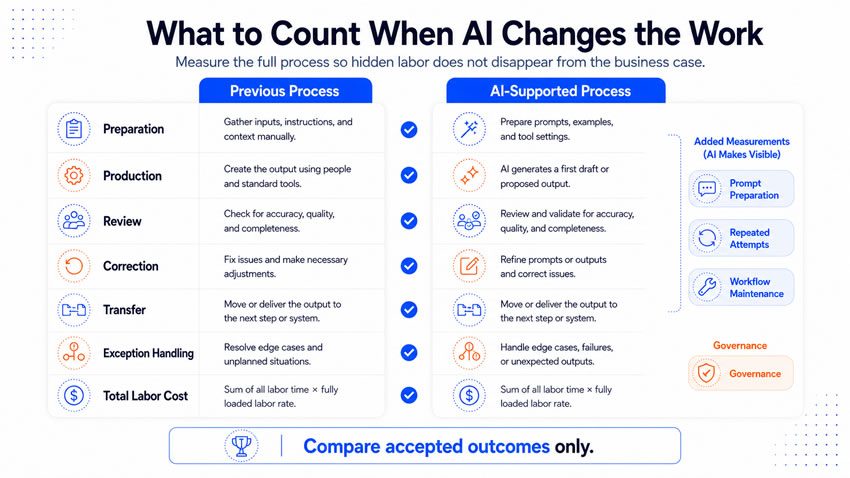
Doing the actual math
A fair comparison measures the previous process and the AI-supported process using the same categories. Those categories include preparation, production, review, correction, transfer, exception handling, and total labor cost. The AI-supported side needs a few categories the old process never had: prompt preparation, input cleaning, repeated attempts, workflow maintenance, and governance. Compare accepted outcomes only, since ten generated drafts cannot be compared against three approved deliverables.
The comparison should show what work was removed, what got transferred to another role, and what new work got introduced or buried inside maintenance. AI often changes who performs work more than it reduces the total amount of it. An administrative task can disappear while a subject expert spends more time reviewing exceptions. That shift can still create real value when expertise moves toward higher-impact decisions, provided you measure and fund the new responsibility.
Nine measures reveal whether a workflow reduced effort or redistributed it poorly. Total touches per completed case and the percentage accepted without correction. Manual transfer time and review hours per case. Exception rate and handling time. Rework rate and maintenance hours. Complete cycle time and accepted throughput against the business outcome that justified the project. Give each measure a baseline, a target, an owner, and a response threshold, or it is only a number nobody is accountable for.
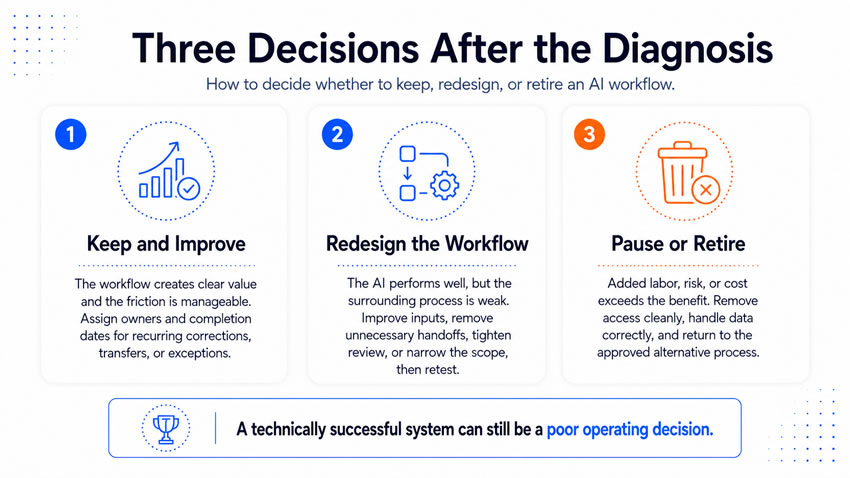
What the diagnosis is telling you to do
A workflow producing clear value with manageable friction should be kept and improved. Recurring corrections, transfers, or exceptions should get an owner and a completion date. A workflow where the AI performs well but the surrounding process remains weak needs redesign. That can mean better inputs, fewer handoffs, clearer review, or a narrower scope, followed by a return to controlled testing. MIT research argues that wider workflow redesign creates far more potential than isolated task automation ever will. A workflow where added labor, risk, or cost exceeds the benefit should pause or retire. That plan should include data handling, access removal, and a return to the approved alternative process. A technically successful system can still be a poor operating decision.
Fixing it usually takes about a month, worked in stages. Spend the first week watching. Follow representative cases from request through final action. Record every human touch, wait, correction, and exception, and interview the frontline users about the workarounds you noticed.
Spend the second week putting numbers on what you saw. Calculate time, cost, and delay for each friction point, and separate temporary launch effort from recurring operating labor.
Spend the third week redesigning the worst of it. Fix the source data, standardize the instructions, cut the review layers from three down to one, and connect the output destinations directly. Name owners for maintenance and exceptions.
Spend the fourth week testing the revised workflow against representative inputs and typical users. Compare total touches, cycle time, and business outcomes against the baseline. Approve continued operation only once the evidence supports it.
Artificial intelligence can remove valuable work and improve access to information. It can also create preparation, correction, review, and maintenance that nobody included in the original business case. The strongest workflow measure covers the entire process from request through accepted business action. It counts the work performed by employees, reviewers, and technical teams alike. The work surrounding the response, not the response’s speed, is what proves a workflow created value.