
Summary
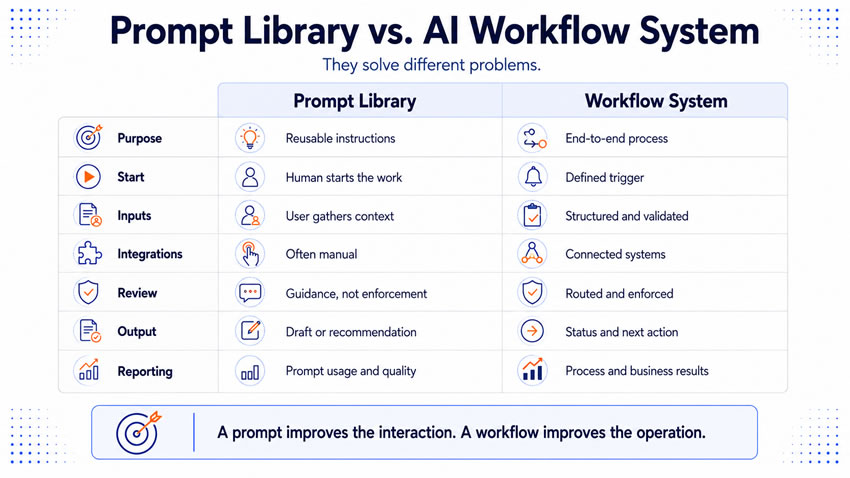
A prompt library helps your employees give artificial intelligence (AI) better instructions. An AI workflow system defines how your organization completes recurring work from the original trigger through the final business action. Both assets reduce repeated effort, but they solve entirely different problems. A prompt can tell a model how to research an account or draft content. It does not decide when the work should begin or which records an employee may access. It does not decide who has to review the result before it goes anywhere.
Confuse the two, and you end up with an impressive collection of instructions and almost no repeatable operating capacity. Employees still decide when to use each prompt, judge the output, move the result, and manage every exception by hand. Anthropic’s prompting tools support templates and variables for exactly this kind of repeatable task. OpenAI recommends flexible base prompts with variables when teams need to support related use cases without maintaining dozens of separate instructions. MIT Sloan research argues that organizations create real value by redesigning complete task sequences and human-machine handoffs. That is a different thing entirely from polishing the instruction sitting at the center of one interaction. A prompt library strengthens individual and team execution. A workflow system connects that execution with people, data, technology, controls, and business measures.
Use a prompt library to standardize reusable instructions
A strong prompt names the purpose, context, source requirements, and expected output format, often built around variables employees fill in for each case. A library puts those instructions in one shared place instead of forcing every employee to start from an empty chat window. It also preserves working methods that experienced employees have already refined. A useful library might hold prompts for researching an account, summarizing approved documents, or classifying a service request. Each one needs enough guidance attached that employees can find and adapt it.
Give each prompt record more than the instruction text:
- The business purpose and the intended user.
- Required inputs and prohibited information.
- Approved sources and expected output format.
- Known limitations and the human review expectation.
- An owner and a last evaluation date.
Attach a status field, draft, testing, approved, restricted, retired, and it keeps your library honest about what is ready to use. A library like this solves instruction reuse. It reduces the need for several employees to independently design the same request, and it gives your team shared language and output expectations. Your employee still controls the broader process: when to begin, which case to run, and whether the available information is even suitable.
Use a workflow system to manage an end-to-end process
A workflow begins with a trigger, a customer submission, a qualified signal, a scheduled date, and ends only once the intended business action occurs. Generating an output is one stage inside that process, not the whole thing. The workflow retrieves information, applies a prompt, evaluates the response, and routes selected cases for review. It then updates another system, coordinating people, models, rules, and applications across the complete sequence.
Define the complete operating design in the workflow record:
- The business problem, the owner, and the trigger.
- Required and optional inputs, and approved data sources.
- Business rules, decision points, and human review requirements.
- Known exceptions and the escalation path.
- Connected systems and the output’s status.
- The next business action and monitoring requirements.
- Performance measures and the manual fallback.
Name every prompt or template the workflow uses. A workflow can contain several prompts as components without ever becoming the prompt itself. This kind of system solves coordination and dependable delivery. It reduces the need for employees to remember every step and follow-up, and it makes ownership and performance genuinely visible. The prompt produces a research draft. The workflow delivers the business result.
Notice that the difference starts with the trigger
A prompt library usually depends on a person to start the work: recognizing a need, finding the right prompt, gathering information, and beginning the interaction. That gives your employees real control over timing and case selection. It fits work depending on judgment about when assistance would help, a strategy leader before a market discussion, a writer after finishing a draft. No system event replaces that judgment as well as the employee sitting there.
A workflow system uses a defined trigger instead: a person, a schedule, an event, or a threshold. A human trigger fits irregular demand and substantial professional judgment, where the employee should decide whether a task deserves attention at all. A system trigger fits recurring work that should begin consistently after an observable event. It becomes worth building the moment missed or delayed starts create a real business cost.
Handle inputs, integrations, and approvals differently for each asset
A prompt describes what information an employee should provide, with the employee usually gathering and entering it themselves. Their own experience can compensate for a missing field or weak source material, a judgment call that stays entirely outside the prompt itself. A workflow has to define how inputs enter the process automatically. It also needs to define what happens the moment they are missing, conflicting, or prohibited. Nobody’s personal judgment is standing there to catch the problem in real time.
Prompt libraries can run without formal integrations at all, employees copying text between applications by hand. That works fine for low-volume or high-judgment tasks, and it supports early experimentation before you fund real technical development. Manual movement becomes a real operating cost as volume grows, though, and the final output can quietly disconnect from its sources and review history. A workflow system connects the relevant applications directly once the business case supports it. It retrieves from a source system and places the approved result into the system of record, with real monitoring and recovery procedures behind every connection.
Approval works the same way. A prompt can tell an employee that an output requires review and even include a reviewer checklist. It cannot guarantee the review happens, since the employee might forget or misunderstand who has authority. A workflow can route outputs through defined approval points and prevent an unapproved output from ever reaching the next stage when approval is mandatory. NIST recommends exactly this kind of defined human role and continuing risk management for AI systems.
Give outputs a real operating status
A prompt defines the requested format: a table, a summary, a draft message. It never establishes the output’s real authority on its own. Your employees need to know which status a result holds:
- A draft still needing work before anyone relies on it.
- A recommendation waiting on a decision.
- An approved record ready for the system of record.
- An authorized action cleared to proceed within defined limits.
A prompt library can describe the intended status. The workflow is what enforces and records it.
Match ownership and reporting to each asset’s real purpose
Prompt ownership covers testing the instruction against representative examples, maintaining variables, and tracking model changes. It usually belongs to a subject expert or an experienced user. Workflow ownership covers the business result and the complete operating process: funding review capacity, approving material changes, and deciding whether to expand or stop. A production workflow typically needs several named roles working together: the business owner, workflow designer, and subject expert. The data steward, reviewer, technical owner, governance owner, and measurement owner round out the set. One person can reasonably hold several of these on a small team.
Match your reporting to the asset. A prompt library report tracks whether employees can find and use the instructions effectively: active users, acceptance without major revision, correction categories. That is useful for maintaining the library, but it does not establish the business value of the complete process. A workflow scorecard needs to connect activity to operational and business results directly. Cycle time, exception rate, adoption, and revenue contribution all belong here, compared against a real baseline from the previous process. Prompt reporting answers whether the instruction works. Workflow reporting answers whether the business process works.
Know when a prompt library is genuinely enough
A prompt library can support important work without ever becoming a workflow. Some tasks happen occasionally, depend heavily on judgment, or change substantially between cases. A leader evaluating a new market a few times a year, or a manager preparing for a difficult employee conversation, both fit this pattern. A formal workflow would only add unnecessary administration to work like that. A prompt library is likely enough when the task occurs occasionally and the user should genuinely decide when to begin. It is also enough when manual transfers stay manageable and the output always needs employee review regardless of how you build the process.
A workflow becomes the stronger candidate the moment coordination itself becomes the actual problem. Demand repeats at real volume, several employees do similar work independently, or missed triggers create real delays. You may have no evidence at all about volume, correction rates, or business outcomes. Your business case then needs to include implementation, integration, review, and ongoing maintenance. Expected value has to clear that complete operating cost before the workflow earns approval.
Read the warning signs, since they point in different directions for each asset
A prompt library usually fails through weak management: too many overlapping choices burning employee time, or no clear owner for a weak instruction. No evaluation evidence behind an approval is another common failure. Poor naming and categories can make prompts nearly impossible to find. The fix is almost always consolidation, a named owner with a review date, and real test evidence behind every approved version.
A workflow system fails for different, usually more consequential reasons. Your team may automate the model interaction alone while employees still gather inputs and move outputs manually. Nobody owns the business result, only the technical system. Review might happen through informal messages instead of the operating record, so the record quietly overstates how much real oversight occurred. Exceptions can depend on one person’s personal knowledge instead of a documented destination. Integrations fail silently while the model still reports success, and reporting stops at generated volume instead of accepted work and business outcome. Each of these points to a different missing piece of ownership, not a technology problem.
Use a five-stage maturity model to guide the investment
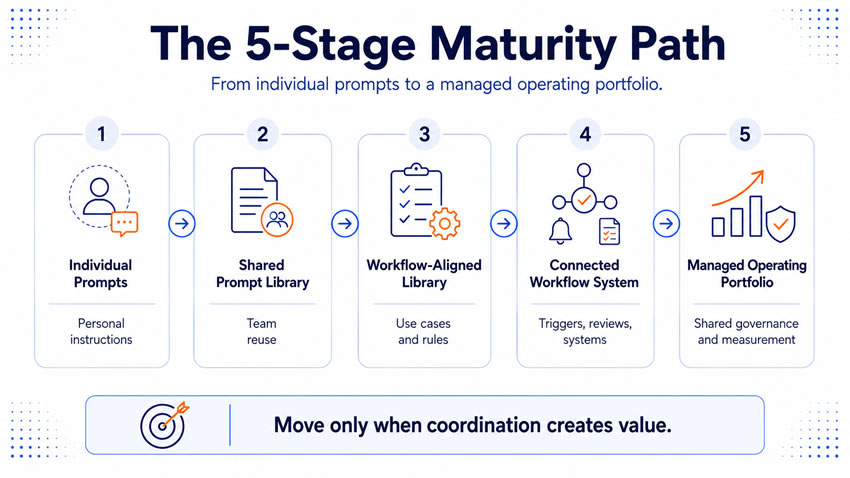
Individual prompts start the journey, employees creating personal instructions for their own work while knowledge stays trapped in individual habits. A shared prompt library follows, with teams collecting and maintaining reusable instructions while the wider process stays mostly manual. A workflow-aligned prompt library connects those instructions to defined use cases, source assets, and review rules. It makes clear which parts of the process still sit outside the prompt.
A connected workflow system links triggers, data, prompts, reviews, systems, and reporting together inside real production boundaries. A managed operating portfolio completes the arc, with leadership running several workflows through shared governance, measurement, and retirement processes. Every prompt component sits under real version control. Each stage can create genuine value on its own. The right level depends on the work, the demand, and the expected return, not on reaching stage five for its own sake.
Answer seven questions to decide what to build
Does the task need reusable instruction or process coordination? A prompt library fits repeated thinking work. A workflow system fits a repeated operating process with several steps and owners. Who decides when the work begins, a person’s judgment or a consistent event?
How many systems participate, one environment a prompt can handle, or several requiring real integration? Does the output require enforced approval, or does professional review genuinely cover it? What happens after the output appears, a person deciding the next step, or a predictable action that belongs inside the workflow itself?
Does leadership need real process reporting, or do prompt-level metrics already answer the question? Finally, can the expected value support the continuing maintenance a workflow system demands? That responsibility never goes away once you build it.
Run this 30-day plan to connect the two assets
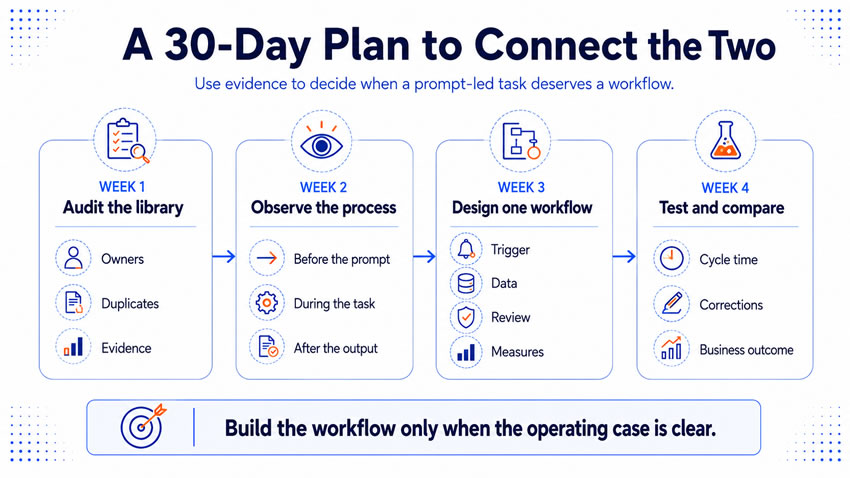
Week one. Audit the current prompt library. Review owners, use cases, and evaluation evidence, remove duplicates, and identify which prompts support genuinely repeatable, valuable work.
Week two. Observe the surrounding process directly. Follow several cases before and after the prompt interaction, and measure the work happening entirely outside the prompt itself.
Week three. Design one workflow around a process with repeatable demand and an engaged business owner. Define the trigger, data, review, exceptions, destination, and measures, keeping the first scope deliberately narrow.
Week four. Test the connected system with typical users, normal inputs, and known exceptions. Compare it directly against the prompt-led manual process on cycle time, corrections, and business outcomes, and let that evidence decide whether the workflow earns expansion.
What you tell them at the end
A prompt library makes reusable thinking easier to share. A workflow system makes a recurring business process easier to operate and manage. The library can improve consistency long before you build any integrations, preserving expertise and reducing duplicated effort. The workflow adds the trigger, validated inputs, connected systems, and reporting that turn a good instruction into dependable organizational capacity.
You need both the moment a tested prompt becomes part of a recurring business process. The prompt should never carry responsibilities that belong to the workflow, and the workflow should never hide the judgment shaping its AI output. Clear separation between the two creates better ownership, easier maintenance, and results your company can depend on.