
Summary
Many marketing teams start organizing artificial intelligence (AI) by collecting prompts. That feels productive at first, and it solves almost nothing for long. A folder of prompts without context becomes another place to lose good work.
The distinction is the whole point. A prompt library stores instructions. An AI capability repository stores the working system around those instructions.
McKinsey’s 2025 State of AI report found that nearly nine in 10 organizations regularly use AI, yet most remain in experimentation or pilot stages. About one-third report that they have begun scaling AI programs. Individual fluency is common, and shared capability is still harder to build.
The cost of skipping this structure shows up in the research. Gartner expects at least 30 percent of generative AI projects to be abandoned after the proof-of-concept stage, citing poor data quality, weak risk controls, rising costs, and unclear business value. Those four causes map almost exactly onto the parts a repository is built to manage.
I have built versions of this system for real teams. The repository is where scattered talent turns into something the whole team can use and improve.
What an AI Capability Repository Is
An AI capability repository is a shared operating hub for a marketing team. It stores and governs the team’s reusable use cases, workflows, prompts, source assets, examples, review standards, and training materials in one place.
A strong repository answers practical questions on demand. It tells the team which workflows are approved, which prompts are reliable, and what inputs each workflow requires. It also shows which source materials are safe to use, who owns each workflow, which outputs require human review, and when each asset was last checked.
A repository like this behaves like an operating system rather than a documentation chore. People go to it to do work, not to file paperwork after the work is done.
This article explains the model behind a marketing AI capability repository. For the step-by-step Notion build, including database properties, relation fields, dashboard views, templates, and a worked example, read: How to Build an AI Capability Repository for Marketing Teams.
Why Prompt Libraries Fail on Their Own
A prompt library usually fails because it separates the prompt from the business process it supports. The instruction survives, and the context that made it useful disappears.
The common failures are easy to spot once you look for them.
- The prompt has no named owner.
- The prompt does not list the inputs it requires.
- The prompt includes no example of a strong output.
- The prompt never explains when a person should use it.
- The prompt carries no review standard or quality check.
- The prompt does not say which source material is approved.
- The prompt lives outside the workflow where the work actually happens.
Reusable AI capability requires workflow context, and a lone prompt rarely carries it. The repository exists to supply that context every time.
The Framework: The AI Capability Repository Model
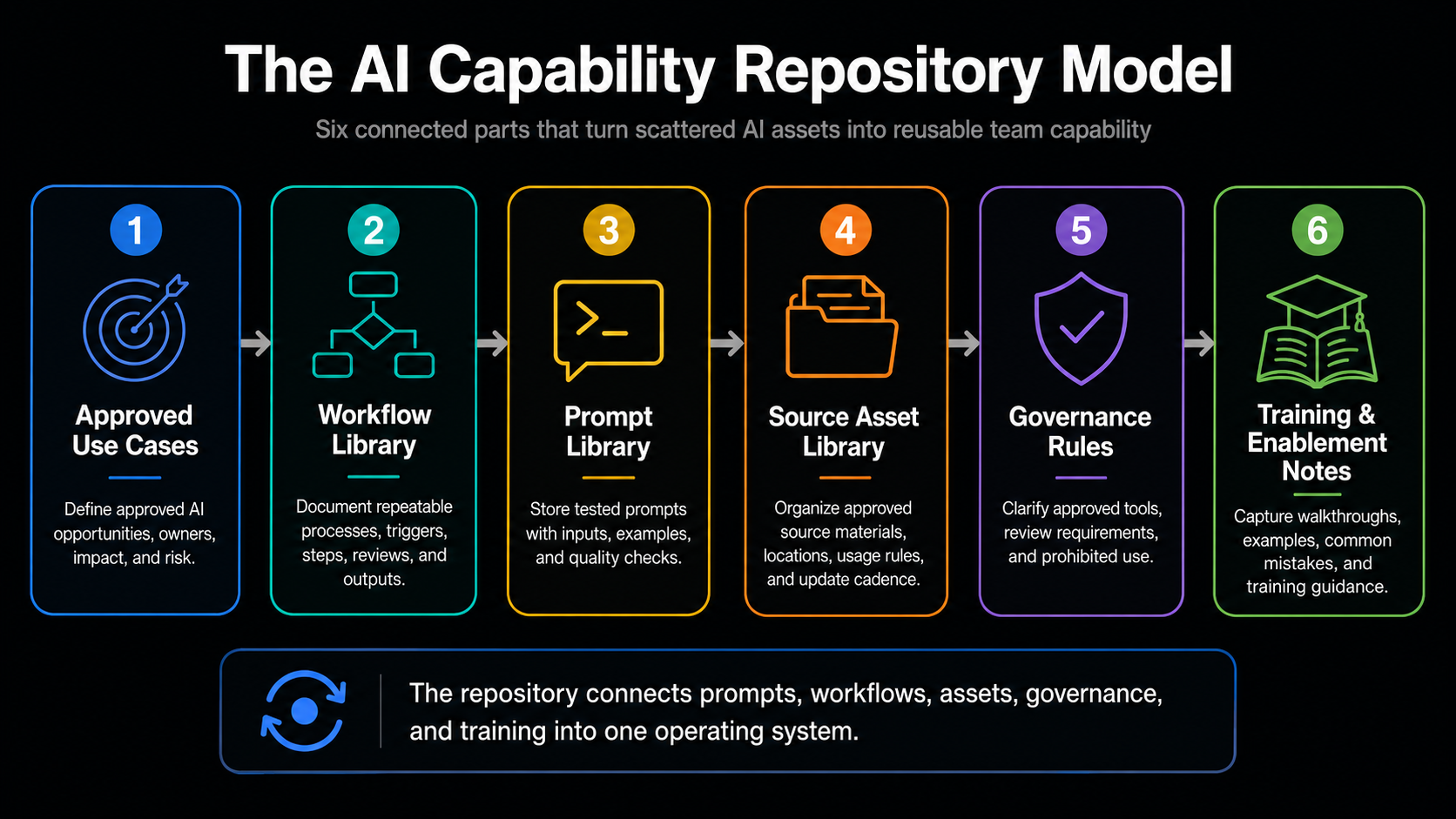
The AI Capability Repository Model organizes capability into six connected parts. The table below gives the at-a-glance version, and the detail follows.
| Repository Part | What It Stores | Why It Matters |
|---|---|---|
| Approved Use Cases | Evaluated and approved AI opportunities. | Stops random experiments from becoming process. |
| Workflow Library | Repeatable operating steps. | Makes the work transferable to others. |
| Prompt Library | Tested prompts with full context. | Turns prompts into reusable assets. |
| Source Asset Library | Approved, governed input materials. | Protects output quality at the source. |
| Governance Rules | Clear boundaries and review rules. | Creates speed through clarity. |
| Training and Enablement Notes | Guidance for correct, confident use. | Converts documentation into adoption. |
Part One: Approved Use Cases
This part stores the use cases the team has evaluated and approved for AI support. Its purpose is to stop random experiments from quietly becoming unofficial process.
Each record captures the use case name, the marketing function, the business problem, and the current manual process. It also records the proposed AI workflow, the business impact, the risk level, the data requirements, an owner, a status, and a review date.
Part Two: Workflow Library
This part stores the repeatable processes themselves. A workflow documented here becomes transferable to another person without a private conversation.
Each entry documents the workflow name, the trigger, the required inputs, and the tools involved. It then records the step-by-step process, the AI role, the human review point, the output format, the storage location, known failure points, and version history.
Part Three: Prompt Library
This part stores prompts with enough context to make them genuinely reusable. The surrounding fields turn a clever instruction into a dependable asset.
Each prompt record includes the prompt name, the use case, the intended user, and the tool or model. It also includes the required inputs, the prompt text, the output format, an example output, a quality checklist, known limitations, and the date it was last tested.
Part Four: Source Asset Library
This part defines which materials the team can safely feed into AI tools. Input quality is not a side issue, because Gartner has predicted that organizations will abandon 60 percent of AI projects that lack AI-ready data through 2026.
Each asset record lists the asset name, the asset type, the location, and the owner. It also lists the approved use, the sensitivity level, the update cadence, the source of truth, and an expiration or review date.
Part Five: Governance Rules
This part sets practical boundaries that the team can actually follow. The aim is a short list of clear rules rather than a thick policy document.
Each rule records the rule name, a plain description, and what it applies to. It also records the approved tools, any prohibited use, the human review requirement, the escalation owner, the reason for the rule, and the date it was last reviewed.
Part Six: Training and Enablement Notes
This part helps people adopt the system and use it well. It closes the gap between a documented workflow and a workflow people actually run.
Each note covers the training topic, the audience, the skill level, and the related workflow. It also covers walkthrough notes, examples, common mistakes, a quick reference link, an owner, and the next update date.
How the Repository Works in Practice
The repository supports a simple, repeatable cycle. The cycle keeps new capability flowing in without letting quality slip.
- A marketing team identifies a workflow problem that repeats often enough to matter.
- The team scores the use case for business impact, risk, and adoption readiness.
- The team documents the workflow before any automation begins.
- The team attaches the prompt to that workflow rather than storing it alone.
- The team links the approved source assets the workflow relies on.
- The team defines the human review rules for the output.
- The team tests the workflow with real examples before approving it.
- The team adds the final version to the repository and enables the people who will use it.
- The team gathers feedback so the next version improves.
A short example makes the cycle concrete. A marketing team might create a weekly campaign performance summary workflow. The use case record explains the business problem and names the owner. The workflow record defines the trigger, the inputs, the AI step, the review point, and the output format. The prompt record stores the approved analysis prompt, the required fields, and an example output. The source asset record links the approved campaign data and reporting exports. The governance record states what requires human review before the summary reaches leadership. The training note then shows a teammate how to run the workflow correctly.
The Notion Structure I Would Use
A practical version can start in Notion with six databases and one executive dashboard. At the model level, the structure includes AI Use Cases, Workflows, Prompts, Source Assets, Governance Rules, and Training Notes.
The homepage should answer five questions at a glance. It should show which AI workflows are approved, which use cases are active, which prompts are reusable, which assets are safe to use, and which workflows need review.
The tactical setup matters because relations, filtered views, templates, review dates, and dashboard sections turn those databases into a working system. I cover the full Notion build in the companion guide: How to Build an AI Capability Repository for Marketing Teams.
What to Include in the Executive Dashboard
The dashboard lets a leader see the state of AI capability without opening every database. It turns the repository into a management view rather than a filing cabinet.
- Active AI workflows show what the team relies on today.
- Approved use cases show what has cleared evaluation.
- Prompts grouped by marketing function show coverage and gaps.
- Workflows awaiting review and high-risk workflows show where attention is needed.
- Recently updated assets and the monthly review queue show whether the system is being maintained.
- Open decisions and governance reminders show what leadership still needs to resolve.
Governance Without Slowing the Team Down
Good governance should create speed rather than friction. People move faster when they know what is approved, where to find it, and when to ask for review.
This matches what the large advisory firms keep finding. Deloitte’s State of Generative AI in the Enterprise series identified governance, risk, and data as central barriers to scaling AI rather than minor concerns. A lightweight governance layer is how a team removes that barrier without adding bureaucracy.
A short set of rules covers most of the real risk. The rules should clarify which tools can handle which data, which materials people may upload, and which outputs require human review. They should also clarify which workflows can be automated, which use cases need leadership approval, how weak outputs get reported, and how outdated prompts and workflows get retired.
How to Migrate Existing Prompts and Notes
Most teams do not start from a blank page. They already have prompt documents, chat histories, training files, and unofficial workflows worth keeping.
Step one. Inventory what already exists, including prompt files, workflow notes, training guides, examples, and standard operating procedures.
Step two. Group the assets by function, using categories such as content, campaign operations, demand generation, reporting, sales enablement, research, and leadership communication.
Step three. Separate experiments from reusable assets, and keep only the assets that support repeated work.
Step four. Add the missing context to each retained asset, including an owner, a use case, required inputs, a review standard, an example output, and a last reviewed date.
Step five. Test each workflow or prompt with realistic inputs before you label it approved.
Step six. Create the first training path so people know which assets to use first rather than browsing everything.
What Leaders Should Measure
Measurement keeps the repository alive after the initial enthusiasm fades. Treat the following as operating measures rather than guaranteed outcomes.
- The number of approved workflows shows the breadth of shared capability.
- The share of active workflows with named owners shows accountability.
- The share of prompts attached to documented workflows shows real reuse.
- The reduction in duplicate prompt creation shows the system is working.
- Time saved in repeated workflows shows operational value.
- The number of team members trained shows adoption.
- The number of workflows reviewed on schedule shows maintenance discipline.
Common Mistakes
A few predictable mistakes undermine most repositories. Naming them in advance is the cheapest way to avoid them.
- Teams build a prompt library with no workflow context.
- Teams store everything without any quality control.
- Teams fail to name owners for assets and workflows.
- Teams treat governance as a document that no one opens.
- Teams allow outdated prompts to stay active long after the strategy changed.
- Teams forget to include example outputs that show a strong result.
- Teams build a beautiful system that never connects to daily work.
- Teams skip the monthly review habit that keeps the system trustworthy.
A 30-Day Implementation Roadmap
A first working version is realistic within 30 days when ownership and scope stay clear. The goal in month one is a usable system, not a complete one.
- In week one, the team inventories existing prompts, workflows, training notes, and source materials.
- In week two, the team creates the six-database structure and defines the required fields.
- In week three, the team migrates the 10 highest-value assets and tests them with real use cases.
- In week four, the team builds the executive dashboard, trains the first user group, and schedules the first review cycle.
After 30 days, the team should have enough structure to reuse the best assets, retire the weak ones, and decide which workflows deserve automation next.
The Strategic Implication
Artificial intelligence creates more value when a team can reuse, improve, and govern what works. A capability repository protects that value by moving knowledge out of private chats and into a shared operating system.
The repository is where individual AI fluency becomes organizational capability. That shift is what lets a team keep its gains when people change, strategies evolve, and tools come and go.
Key Takeaways
- A prompt library stores instructions, while an AI capability repository stores the system around them.
- Reusable AI capability requires approved use cases, workflows, prompts, source assets, governance, and training.
- Each prompt should connect to a workflow, an owner, required inputs, review standards, and example outputs.
- A Notion repository can start with six databases and one executive dashboard.
- The repository turns individual AI fluency into shared marketing capability.
Frequently Asked Questions
What is an AI capability repository? An AI capability repository is a shared hub for approved use cases, workflows, prompts, source assets, governance rules, and training materials.
How is an AI capability repository different from a prompt library? A prompt library stores reusable instructions. An AI capability repository connects those prompts to workflows, owners, inputs, examples, and review standards.
What should marketing teams include in an AI repository? Marketing teams should include approved use cases, workflow documentation, prompts, source assets, governance rules, training notes, examples, and review dates.
Can this be built in Notion? Notion is a practical starting point, because teams can connect databases, dashboards, documentation, ownership, and review cycles in one workspace.
Who should own the AI capability repository? A Marketing AI Operations lead, a marketing operations leader, or an AI enablement owner should manage it, with input from content, demand generation, revenue operations, and leadership.
Framework Reference: The AI Capability Repository Model
Definition. The AI Capability Repository Model is a six-part structure for organizing reusable AI capability inside a marketing team.
Components. Approved Use Cases, Workflow Library, Prompt Library, Source Asset Library, Governance Rules, and Training and Enablement Notes.
Application. Teams apply the model by documenting approved workflows, attaching prompts to business processes, linking approved source assets, defining review rules, and training users on repeatable use.
Sources
- McKinsey & Company. (November 2025). The State of AI in 2025: Agents, innovation, and transformation. https://www.mckinsey.com/capabilities/quantumblack/our-insights/the-state-of-ai
- Gartner. (2024). Gartner Predicts 30% of Generative AI Projects Will Be Abandoned After Proof of Concept by End of 2025. https://www.gartner.com/en/newsroom/press-releases/2024-07-29-gartner-predicts-30-percent-of-generative-ai-projects-will-be-abandoned-after-proof-of-concept-by-end-of-2025
- Gartner. (February 2025). Lack of AI-Ready Data Puts AI Projects at Risk. https://www.gartner.com/en/newsroom/press-releases/2025-02-26-lack-of-ai-ready-data-puts-ai-projects-at-risk
- Deloitte. (2025). State of Generative AI in the Enterprise. https://www.deloitte.com/us/en/what-we-do/capabilities/applied-artificial-intelligence/content/state-of-generative-ai-in-enterprise.html