Summary
Picture the renewal invoices landing on your desk this quarter. Finance has one research assistant. Marketing has a different one. Sales already has the same capability built into its customer system, and nobody noticed until three invoices arrived in the same week. Each department can defend its own choice perfectly well. Your company is still paying three times for one capability.
Artificial intelligence (AI) tool sprawl becomes expensive well before finance sees a surprising renewal invoice. Each new tool adds subscription cost, data movement, training, security review, and integration work. Those costs spread across several budgets and departments, so the total rarely shows up in one report.
Microsoft found that 75 percent of knowledge workers used AI at work in 2024. Among those users, 78 percent brought their own AI tools into the workplace without formal approval. Deloitte reported that sanctioned AI access rose from under 40 percent of workers to about 60 percent during 2025. Broader access supports faster learning. It also lets overlapping products accumulate before anyone defines your company’s actual AI system. Tool sprawl begins the moment teams select applications independently, without a shared view of what already exists.
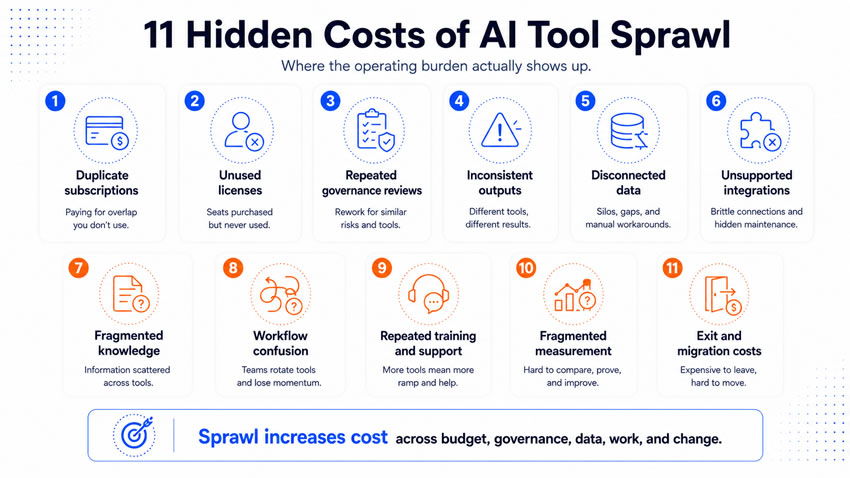
Cost one: watch duplicate subscriptions consume more than the license budget
AI purchasing often starts inside department budgets, expense reports, and existing software contracts. Several teams can buy different tools for research, writing, or data analysis while another platform already includes the same capability. The visible cost is the duplicate license. The hidden cost is the separate renewal, vendor relationship, and administrative overhead behind it.
Zylo’s 2025 index is built on more than 40 million software licenses and 40 billion dollars in managed spending. It found a 75.2 percent annual increase in AI-native application spending. The same data found business functions controlling 70 percent of software spending against only 26.1 percent for IT, which sharply reduces central visibility. A finance team can buy a research assistant while marketing buys a different research platform and sales activates research features already inside its customer system. Each department can defend its own choice. Your company can still end up paying three times for one general capability.
Review tools by capability, not product category:
- Which business problem does each product address?
- How does it compare to capabilities already available?
- Which contract offers the strongest terms and coverage?
Require a real business reason behind every additional product, not one product for every use case.
Cost two: watch unused licenses and premium features stay invisible
A team buys seats for a whole department after a successful pilot. Usage then settles at different rates, and some people end up on a premium plan while using only basic functions. Consumption pricing adds another layer of exposure, since costs can rise with prompts, tokens, or agent activity without anyone noticing until the invoice arrives.
Zylo found that its managed organizations waste an average of 21 million dollars annually on unused SaaS licenses. It also found that 66.5 percent of IT leaders had encountered unexpected charges from consumption-based or AI pricing. Those figures are not a universal savings estimate. They show the exposure created by weak usage visibility.
Give your AI spending three separate views:
- Contract spending: what the company committed to pay.
- Usage spending: what actual activity cost.
- Value reporting: what that activity produced.
Review usage before every renewal. Reduce or cancel access when the evidence cannot justify continued spending.
Cost three: watch every additional product create governance work
AI tools need evaluation beyond price and functionality. Privacy, security, legal, and records teams may all need to examine data handling, retention, and access controls. One careful review is necessary protection. Repeating a near-identical review across five overlapping products consumes specialist capacity that has other places to go. New features can restart the whole process too, when a writing assistant later adds agents or external actions the original approval never covered.
Microsoft reported in February 2026 that 29 percent of employees had used unsanctioned AI agents for work tasks. Only 47 percent of surveyed organizations had specific generative AI security controls in place. NIST recommends lifecycle risk management for generative AI systems and third-party products, and a larger portfolio multiplies how many products need that ongoing attention.
Start your approval process with a capability check. What unmet need does this address, why can an approved tool not meet it, and what expiration date attaches to the decision? Never let a product earn permanent approval only because one team tested it safely under narrow conditions.
Cost four: watch different tools produce different versions of acceptable work
One team gets concise recommendations while another gets lengthy summaries with different assumptions and terminology, since outputs vary across models, prompts, and connected systems. Customer-facing teams using separate products to draft messages and proposals can send a customer several different versions of the company’s voice without anyone intending it. Employees compensate through manual editing, and that labor disappears completely from the software cost calculation.
A model comparison helps during selection. A permanent multi-tool environment needs standing operating rules instead:
- Approved use cases for each tool.
- Required source material and business context.
- Standard instructions for recurring work.
- Human review points based on business impact.
A shared standard requires a consistent definition of acceptable work, not identical language everywhere. Let model choice follow the workflow requirement rather than personal preference.
Cost five: watch disconnected tools create disconnected data
AI products often store prompts, files, and generated content inside separate environments. Some connect directly to company systems. Others depend on downloads or copied text, and that creates several competing versions of the same information. A sales rep updates the customer system after using an external research tool. Someone else leaves the research sitting inside the tool instead. The result is a fractured chain where an employee can see a final output with no visibility into its source or approval history. Each additional connection also expands the number of systems holding read or write access to company information.
Map your data movement from source to destination:
- The authoritative source for each data element.
- What each tool can access and what records it creates.
- Where prompts and review notes live.
- What gets removed when an employee changes roles.
Let AI support your company’s existing information architecture. Never let it quietly build a separate one for every team that adopts a new tool.
Cost six: watch unsupported integrations move work back to employees
A tool generates an account brief but has no dependable connection to the sales system. An employee copies, renames, and uploads the output by hand, and that bridge work quietly erodes the capacity gain the tool was supposed to create. Smaller products often ship with limited documentation, leaving internal teams to build and maintain custom connections nobody budgeted time for.
McKinsey found that United States enterprise technology spending grew roughly eight percent annually since 2022. Labor productivity grew closer to two percent over the same period. That gap does not prove technology caused weak productivity. It does support closer scrutiny of the operating value behind rising technology investment.
Attach a complete workflow cost to every AI purchase:
- Implementation and integration maintenance.
- Remaining manual transfers after launch.
- Monitoring and incident response.
- Testing required after every model or product update.
A lower subscription price can produce a higher real operating cost once employees are covering the gaps the product never closed.
Cost seven: watch knowledge fragment across personal workspaces
Employees build real business knowledge through AI use: prompts, examples, corrections, and workflow instructions. Most of it stays trapped inside personal accounts and private conversations your company technically owns the account for but cannot access. That fragmentation means several people independently solve the same formatting or source problem. It also creates real dependence on specific individuals, since a strong workflow can quietly weaken the moment its creator changes roles.
A tool change makes this worse. A prompt written for one system often performs differently in another. A saved conversation can hold business context that never made it into official documentation. Give your portfolio a shared knowledge structure:
- A use case register with named owners.
- A workflow record covering inputs and decisions.
- A prompt repository for reusable instructions.
- Documented exceptions and known limitations.
The tool itself should never become the only place your organization understands its own work.
Cost eight: watch employees spend more time deciding where work belongs
Employees have to remember which product handles research, writing, meetings, and automation, and which information each one may receive. That decision repeats itself all week long. Your company pays for it through slower work and a steady stream of support questions. Microsoft found that only 39 percent of AI users had received company training. Concern about missing an implementation plan ran even higher among leaders, reaching 60 percent.
A tool directory helps, but employees need workflow guidance, not product descriptions. “Use Tool A for writing” says almost nothing, since writing covers internal notes, public content, and regulated claims that need different handling. Give your clear guidance a name for each of these:
- The approved tool for each defined workflow.
- The information allowed inside that workflow.
- Which outputs need human review.
- The fallback process during a system failure.
Your employees need a dependable route for the specific work in front of them, not expert knowledge of the entire portfolio.
Cost nine: watch training and support repeat across overlapping products
Every additional product creates its own learning requirement: account setup, data guidance, and workflow examples. Vendor training usually explains features without ever touching your company’s own operating rules, leaving internal teams to fill that gap themselves. Training also expires quickly, since interfaces and features can change several times inside one contract period. Employees can sit through several introductory sessions while getting almost no guidance on how the tool changes their daily responsibilities.
Start your training model with the workflow, not the product. Cover the business result it should produce, the approved steps, the source information required, and the known failure patterns. Put product instruction inside that operating context, not delivered as a standalone session. Consolidating tools reduces repeated training on its own. Shared workflow standards reduce the burden further still.
Cost 10: watch measurement fragment across vendors and departments
One vendor reports prompts. Another reports generated words or saved minutes. None of those figures prove a business result on their own. Marketing tracks content volume while sales tracks research completion, and finance sees only subscription invoices. Your company ends up with several positive-looking activity reports and no complete picture of value anywhere.
Deloitte found that only 25 percent of surveyed companies had moved at least 40 percent of their AI pilots into production. Another 30 percent were redesigning key processes around AI. That gap strengthens the case for workflow-level measurement over tool-level activity counts. Give each workflow a baseline, one primary business outcome, full labor and technology costs, and a real decision threshold for continued investment. Let tool-level reporting feed the workflow measure. Never let it replace it.
Cost 11: watch every tool create a future exit project
AI products change, merge, raise prices, or lose internal support. Retirement always requires real work: exporting records, removing access, canceling integrations, and training employees on whatever replaces the tool. Stored prompts and model-specific instructions often do not transfer cleanly. A discontinued tool can still hold business records subject to retention rules or an active investigation.
Before approving any new tool, know these four things already:
- How to export its data and which records must remain available.
- Whether workflow documentation exists outside the product itself.
- What the contract says about deletion and account closure.
- The realistic migration effort before it is needed.
A tool without an exit path can stay expensive long after employees have stopped actively using it.
Know why tool sprawl survives every budget review
Sprawl survives because its costs land under different owners. Finance sees subscriptions. IT sees access and integration work. Security sees risk assessments. Managers see training gaps and inconsistent output. Employees see the switching, copying, and correction. None of these groups sees the complete operating cost without a shared review pulling all of it together. Every individual tool owner can offer a perfectly reasonable explanation for keeping their product, even while the full portfolio stays fundamentally undisciplined.
Use this practical framework to control the portfolio
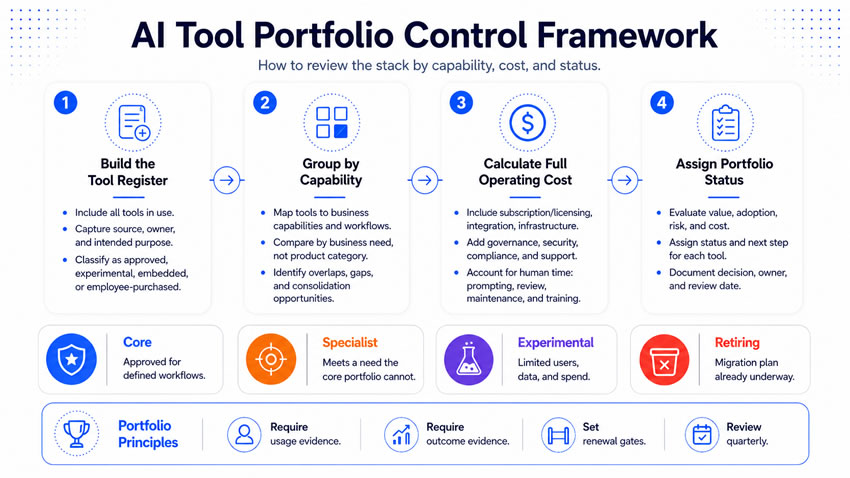
Start portfolio discipline with visibility. Build a complete tool register covering approved, experimental, embedded, and employee-purchased products, including the business owner, connected systems, and renewal date for each one. Group the portfolio by business capability rather than product category, since category labels are exactly what hides duplication in the first place. Calculate the full operating cost for each product, including implementation, integration, and human correction, not only the subscription line.
Assign every product one of four statuses:
- Core: an approved capability for defined workflows.
- Specialist: serving a need the core portfolio cannot meet.
- Experimental: limited users, data, and spending.
- Retiring: a documented migration plan already underway.
Never let “Available” become a permanent fifth status. Agree on the workflow and quality standard before consolidating contracts, not after. Contract consolidation fails constantly when teams keep following different processes underneath the same vendor name. Build renewal gates requiring current usage and outcome evidence. Review the portfolio quarterly, since AI products change too fast for an annual inventory to keep up.
Run this 90-day portfolio reset
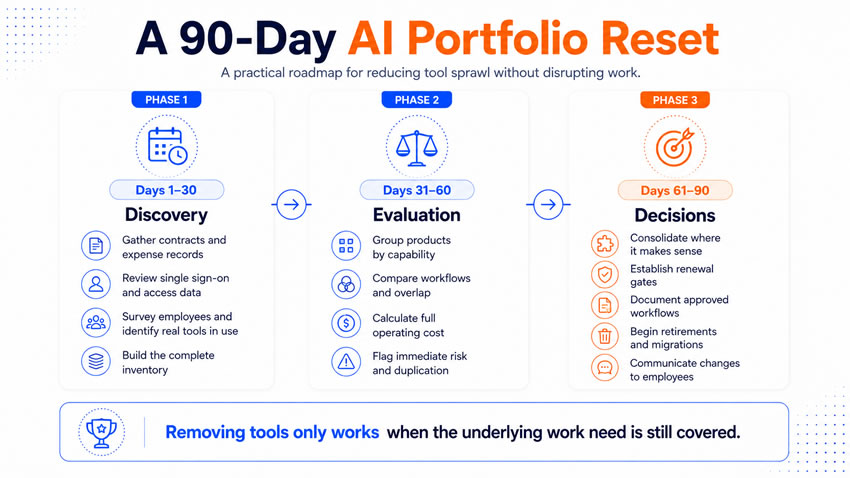
Days one through 30. Focus on discovery. Gather contracts, expense records, single sign-on data, and employee surveys to build the real inventory.
Days 31 through 60. Focus on evaluation. Group products by capability, compare workflows directly, calculate full operating cost, and flag immediate risks.
Days 61 through 90. Focus on decisions. Consolidate the capabilities worth keeping, establish renewal gates, document the approved workflows, and begin the retirements you have already identified.
Communicate with your employees throughout this process. Removing access without addressing the original need pushes people toward the next unapproved product instead of solving anything.
What you tell them at the end
Tool sprawl looks like healthy experimentation in its early stages. The financial and operating burden shows up later, through duplicate contracts, fragmented knowledge, repeated governance reviews, and measurement nobody can reconcile. A disciplined portfolio connects every choice to a business need, an approved workflow, a named owner, and a measurable result, without eliminating real choice.
The real question was never whether employees like a product. It is whether your company can operate, support, govern, and eventually replace it without a mess.