
Summary
Picture the automation project you approved last quarter. On paper it looked ready. In the room, you asked three employees to explain how the work happens, and you got three different answers. That gap did not show up in the demo. It showed up the moment real work hit the workflow, and by then the project had already shipped.
An artificial intelligence (AI) use case should fail the readiness test when the surrounding business conditions cannot support dependable operation. The idea itself can still have real value. Your organization may only need better data, clearer decisions, narrower permissions, or stronger human oversight first.
The National Institute of Standards and Technology (NIST) advises evaluating AI according to its context, intended purpose, and effects, not the technology’s raw capability. McKinsey found that AI high performers were nearly three times more likely to redesign individual workflows. They were also more likely to define exactly when model outputs required human validation. MIT research reaches a related conclusion. AI creates more value when companies redesign complete workflows, including task order and human-machine handoffs, not only the model sitting inside them. These 12 use cases fail the readiness test constantly. Each one becomes viable once the underlying condition changes.
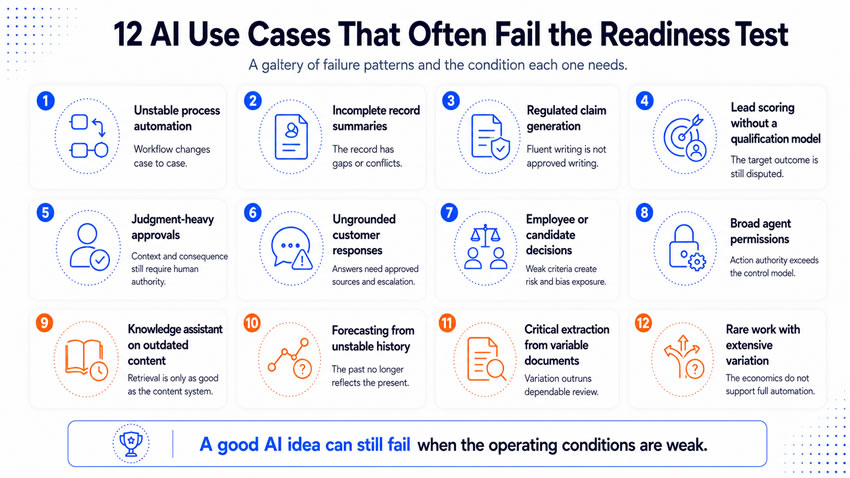
Use case one: watch out for automating an unstable process
AI cannot make an unsettled process dependable. An unstable process changes between employees, departments, or circumstances, and experienced people compensate through judgment the system does not have access to. Automation removes that flexibility and needs operating logic it can apply the same way every time.
This use case fails when your team cannot explain how work moves from request to completion, or when several employees describe genuinely different workflows. It also fails when unresolved policy questions sit buried inside informal workarounds. Automating this environment reproduces the inconsistency at higher speed.
Observe several real cases start to finish, and document:
- The event that starts the process and the information required at each stage.
- The decisions that change direction, and who is involved.
- Common corrections, exceptions, and the action that marks real completion.
Significant disagreement between employees reviewing the map means the process needs design work before automation, not after. AI can enter once your team can explain the process without depending on one person’s memory.
Use case two: watch out for summarizing incomplete or conflicting records
AI summaries can look complete even when the underlying record has real gaps. The system organizes whatever is available without recognizing what should have been there. This shows up constantly in customer histories, project records, and research archives. Important decisions often live in email or private notes that never entered the official system.
Two sources can also disagree on a date, amount, or status, and the model may pick one version without knowing which source holds authority. A polished summary then hands the reader more confidence than the evidence deserves.
Review a representative sample of records before testing anything. Measure the percentage with all required information, the percentage with conflicts, and how often decisions went undocumented entirely. Test records with known gaps directly. The workflow needs a minimum information standard and clear source authority rules, and it should recognize uncertainty rather than fill gaps through unsupported inference.
Use case three: watch out for generating regulated or legally sensitive claims
AI can draft a claim fast. The approval process around it determines whether that claim belongs anywhere near a customer. This covers health products, financial services, contracts, warranties, and privacy statements.
The model can generate language from broad patterns instead of your company’s actual approved evidence. It can overstate a benefit or quietly change legal meaning through fluent-sounding wording. Employees often mistake fluent writing for approved writing, and the risk compounds fast if the system can publish or send content without qualified review first.
Identify every claim category the workflow might generate, and document the required evidence, approved wording, and named reviewers for each one. Test with difficult, unsupported requests specifically. Your company needs an approved claim system, retrieving only from approved material, with qualified review matched to risk and audience before generation goes live. Automatic publishing should wait until the evidence supports a narrower review model.
Use case four: watch out for scoring leads without a defined qualification model
Lead scoring fails when your company has not agreed on what a qualified lead is. The system finds patterns fine. Those patterns often only reflect historic sales behavior rather than future value.
Marketing and sales frequently use different standards. Historic data can also reflect inconsistent follow-up rather than real account quality, accounts that look weak only because nobody ever called them. A model trained on that history reproduces old decisions without ever revealing their weaknesses.
Review the current qualification process and historical outcomes. Examine the gap between interest and real purchase readiness, plus false positives and missed opportunities the old process created. Interview marketing and sales leaders separately before bringing them together, since their disagreements usually reveal the unresolved assumption underneath everything. Your company needs one agreed qualification model tied to real business outcomes before scoring becomes viable.
Use case five: watch out for replacing judgment-heavy approvals
AI can organize evidence and recommend an action. Replacing the actual approval judgment needs a much higher readiness standard, especially in pricing, hiring, credit, and customer remedies.
These approvals usually weigh competing factors, like commercial relationships, precedent, and fairness, that never show up in structured data. The resulting commitment can also be hard to reverse. MIT researchers specifically recommend keeping human responsibility for judgment and long-term consequences where outputs need deeper evaluation than a model can supply.
Document how experienced approvers reach their decisions, including the judgment factors they apply and how often two approvers disagree with each other. Compare AI recommendations against expert decisions across representative cases, and treat the differences as something to analyze, not automatically blame on either side. Keep approval authority with a qualified person for anything with meaningful impact or heavy contextual judgment. Automation can grow into narrower decisions with defined limits and reversible outcomes.
Use case six: watch out for sending customer responses without grounded sources
AI can answer customers fast. Speed means little when the answer conflicts with policy, account history, or current product information. Customers read a confident response as an official company position.
The workflow can rely on outdated documents or general model knowledge instead of approved sources, and answer beyond its real scope. It can also miss the signal that a case needs specialist judgment. An incorrect answer creates rework, complaints, and sometimes an unintended commitment your company now has to honor.
Review the questions customers ask against the information available to answer them. Measure how much falls inside approved knowledge versus requires account-specific context or specialist judgment. Test ambiguous questions directly. Your company needs a governed knowledge source with a named owner and review date. It also needs a clear escalation path before automation earns a wider question set.
Use case seven: watch out for making employee or candidate decisions from weak criteria
AI can organize applications and summarize evidence. It fails readiness when your organization lacks defined, job-related criteria or real oversight. Historic hiring decisions can reflect inconsistent expectations the system will happily learn and repeat.
A model can infer suitability from a proxy variable instead of actual job-related evidence. Candidates often have no visibility into how a decision happened or how to challenge it. The consequences land on real people and carry legal and reputational exposure that other use cases do not.
Review the relationship between each criterion and actual job performance, and check for outcome differences across groups. Include human resources, legal, and data expertise in the evaluation, not only the technical team. Your organization needs validated criteria, meaningful human oversight, and an accessible appeal process before this use case earns any real automation.
Use case eight: watch out for giving an AI agent broad system permissions
Agents can complete multistep work across business systems, and that ability to act increases value and exposure together. An agent with wider access than its job requires can affect several connected systems from one mistaken instruction or compromised account. Errors become harder to contain once actions happen quickly across several applications at once.
Map every permission and possible action the agent could take. Know what it can read, create, or delete, which actions require approval, and whether logs exist to reconstruct what happened. Test the agent in a controlled environment first, including malformed instructions and unauthorized requests specifically. The agent needs minimum necessary access, bounded actions, and reliable monitoring, with human approval required for anything irreversible. Deloitte reports agent use rising quickly while governance maturity across most companies lags well behind it.
Use case nine: watch out for building a knowledge assistant on outdated content
Knowledge assistants make information easier to find. Their value depends entirely on the information system underneath them. Company knowledge usually sits scattered across shared drives, messages, and personal files, with several versions of the same document floating around.
The assistant can retrieve something that looks authoritative without knowing which version employees should follow. Employees stop verifying sources once they start trusting the assistant, which quietly amplifies the effect of outdated guidance. Audit the material behind the assistant. Check how much has a named owner and review date. Note how many duplicate or conflicting documents exist, and how many answers the source material genuinely cannot support. Your company needs content ownership and lifecycle rules first. The model cannot become the owner of company truth on its own.
Use case 10: watch out for forecasting from limited or unstable history
Forecasting finds relationships inside historical data, and those relationships weaken fast when the business or market changes underneath them. Available history can contain too few comparable events, or the business may have shifted pricing, products, or channels since the data was collected.
A model can fit past data beautifully while performing poorly under current conditions, and the risk gets worse when leaders read model precision as certainty. Examine the number of genuinely comparable periods, missing records, and unusual events that distorted past performance. Back-test against periods the model never saw during development, and compare it honestly against simpler methods. Your organization needs enough comparable history and a defined confidence model, with ranges and assumptions attached, before one precise number should drive a real decision.
Use case 11: watch out for extracting critical data from highly variable documents
Extraction works on contracts, invoices, and reports, but fails readiness once document variation exceeds what the workflow can evaluate and review. Layouts, terminology, and quality vary widely across documents, and a required field can appear in several different locations depending on the source.
The system can return a plausible value pulled from the wrong section entirely, and that silent error enters downstream systems long before anyone notices. Build a representative document set covering older templates, scans, and missing fields. Evaluate performance field by field rather than one blended accuracy score, since a workflow can extract names reliably while failing badly on financial terms. Critical fields need stronger verification than administrative ones, and low-confidence results should route to human review automatically.
Use case 12: watch out for automating rare work with extensive variation
Automation gets hard to justify when work happens infrequently and changes substantially between cases. The technical capability might exist fine. The operating economics often do not hold up, since your team can spend more time designing and maintaining the workflow than it ever saves.
Limited volume also makes performance genuinely hard to evaluate. A rare event may never produce enough examples for dependable testing, even while individual cases still carry real consequence. Estimate the complete cost: annual volume, variation between cases, implementation cost, and review and maintenance work, and compare full automation honestly against targeted assistance instead. A research assistant or checklist can create real value without automating the entire process. The use case needs greater repeatability, greater volume, or a narrower target before full automation earns its cost.
Know that a failed readiness test is not a dead idea
A failed readiness review should produce a management decision, not a permanent label. Four outcomes typically follow. You can repair the operating condition, stabilizing the process or clarifying ownership, then return the use case for another look once that work is done. You can narrow the use case, starting a customer service agent with 20 approved questions instead of the whole domain. You can also extract three dependable fields while people keep reviewing the complex terms. You can shift from automation to assistance, letting the system gather evidence and prepare options while a qualified person keeps the final judgment. Finally, you can stop the use case entirely, when the expected benefit stays too small or the risk exceeds what your company will tolerate. Stopping a weak use case protects resources for the stronger ones still waiting.
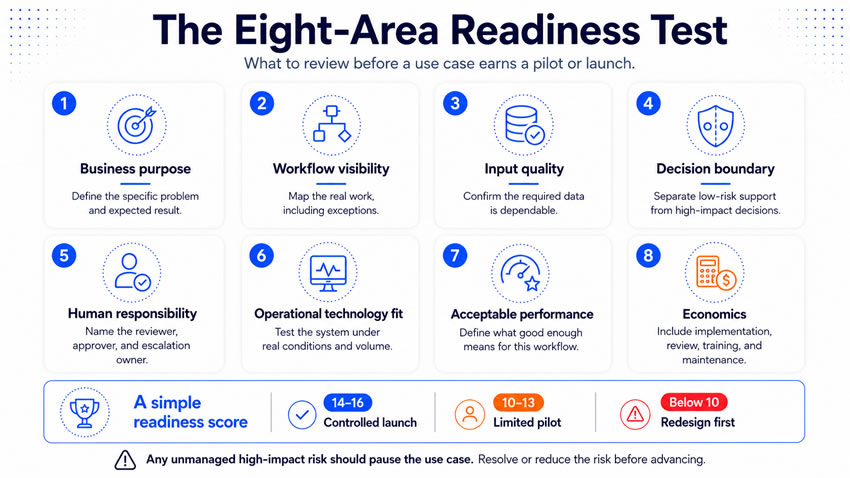
Run the readiness test across eight areas
A structured review covers eight areas before your team ever selects a production tool. The business purpose needs to be specific: “reduce the time to answer approved product questions” is workable, “use AI in customer service” is not. The workflow needs to be visible, including hidden work that never made it into the original design. Inputs need to be dependable, with a defined response for when they are not.
The decision boundary needs to be clear, since high-impact and irreversible actions need stronger controls than everything else. Human responsibility needs a name attached to every review and escalation point, since “human in the loop” alone provides no real operating guidance. The technology needs to support real operations, tested against actual volume and common failure conditions, not a clean demo. Acceptable performance needs a real definition tied to consequence, not one blended accuracy number. The economics need to include the complete workflow too, implementation, review, training, and maintenance, not only the hours saved on one task.
Score the readiness with a simple test
Score each of the eight areas from zero to two. A zero means the condition is unknown or unmanaged. A one means partial evidence exists but real design work remains. A two means the condition is defined, tested, documented, and owned. Eight areas produce a possible score of 16.
- A score from 14 through 16 can support a controlled launch.
- A score from 10 through 13 can support a limited pilot.
- A score below 10 should send the use case back for redesign.
Let any unmanaged high-impact risk pause the use case regardless of the total score. The number supports comparison across candidates. It should never override a serious problem involving people, security, privacy, or an irreversible decision.
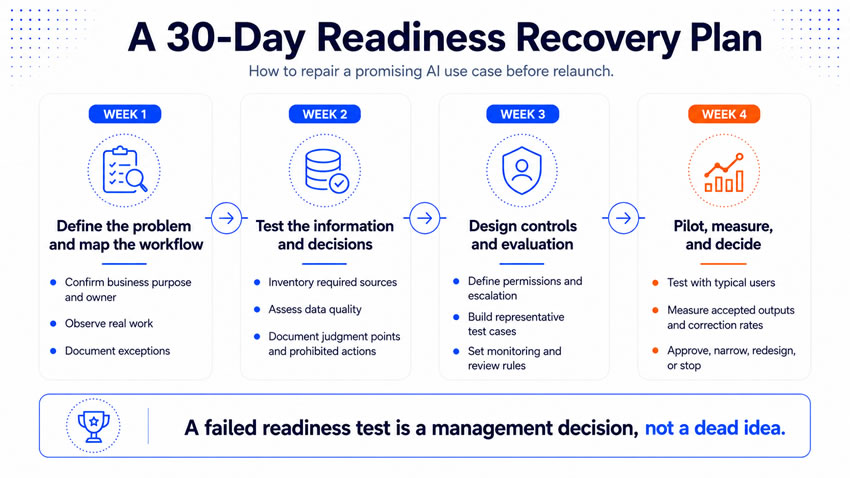
Run this 30-day readiness recovery plan
Week one. Define the problem and map the workflow. Confirm the business purpose, owner, and expected result, then observe real work and document the exceptions.
Week two. Test the information and decisions. Inventory the required sources and assess their quality, then document decision criteria, judgment points, and prohibited actions.
Week three. Design controls and evaluation. Define access, permissions, escalation, and monitoring, then build representative test cases covering normal work and difficult exceptions.
Week four. Test the revised use case with typical users and production-like conditions. Measure accepted outputs, correction rates, and business results, then approve, narrow, redesign, or stop the use case based on what the evidence shows.
What you tell them at the end
AI use cases usually fail because your company evaluated the technology before evaluating the operating environment around it. A capable model cannot settle a disputed process, create a missing record, or accept accountability for a consequential decision on your organization’s behalf. Those conditions are your job to build.
A readiness test gives you a practical way to find out what has to change before launch. That might mean better information, narrower boundaries, stronger review, or a different economic case entirely. AI becomes real operating capacity once the process, people, information, and controls around it can support it.